
Local-first AI for your video library
Give every video a name that means something.
AI Video Cataloger watches, transcribes and summarizes the videos in any folder - then renames them by what is actually inside. All on your Mac. No cloud required.
v0.3.0 early alpha - free - macOS (Apple Silicon) - .dmg, about 153 MB
The app is not notarized yet: on first launch, right-click the app and choose Open. If macOS still refuses, allow it in System Settings -> Privacy & Security -> Open Anyway. Expect rough edges - and please report them.
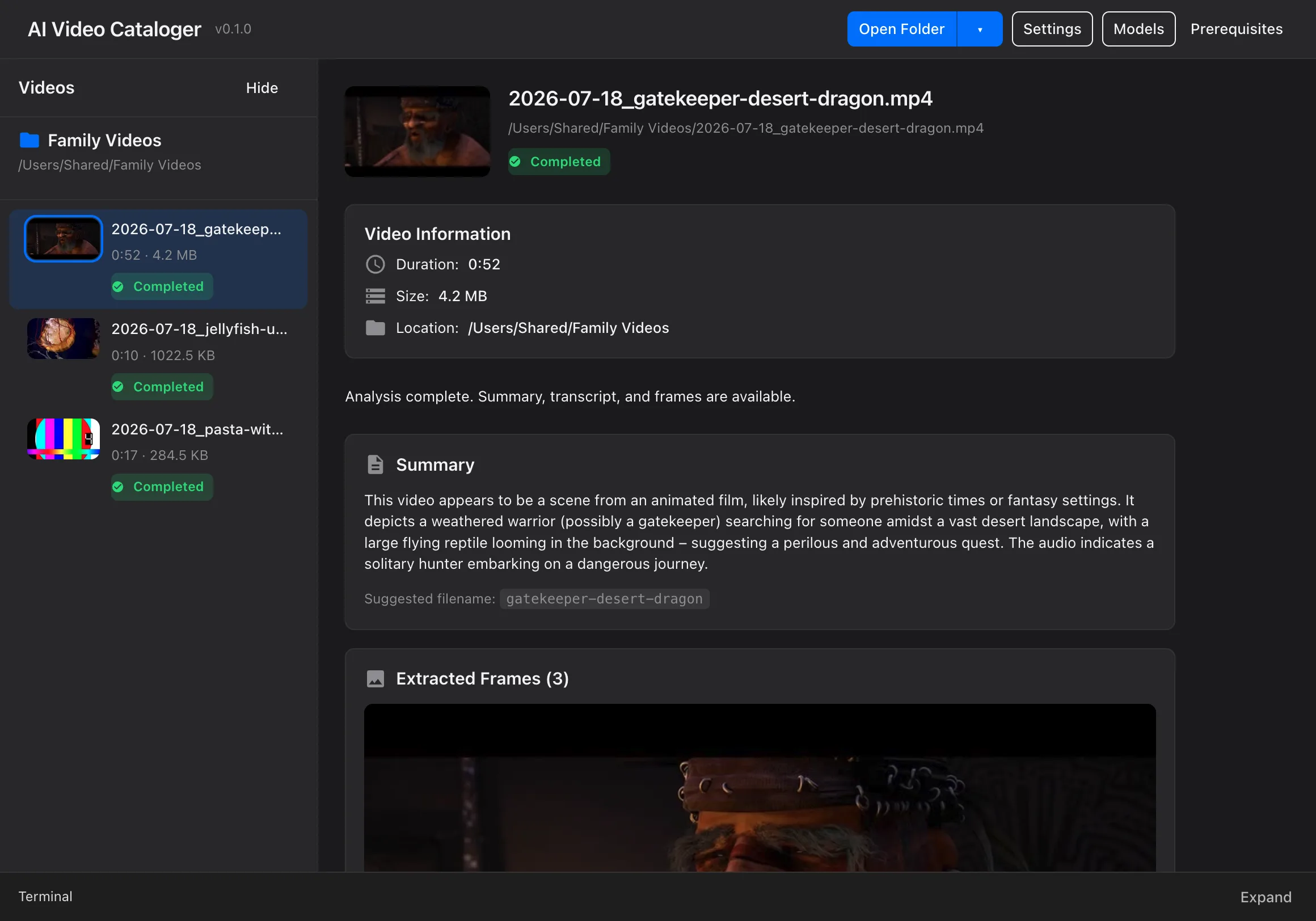
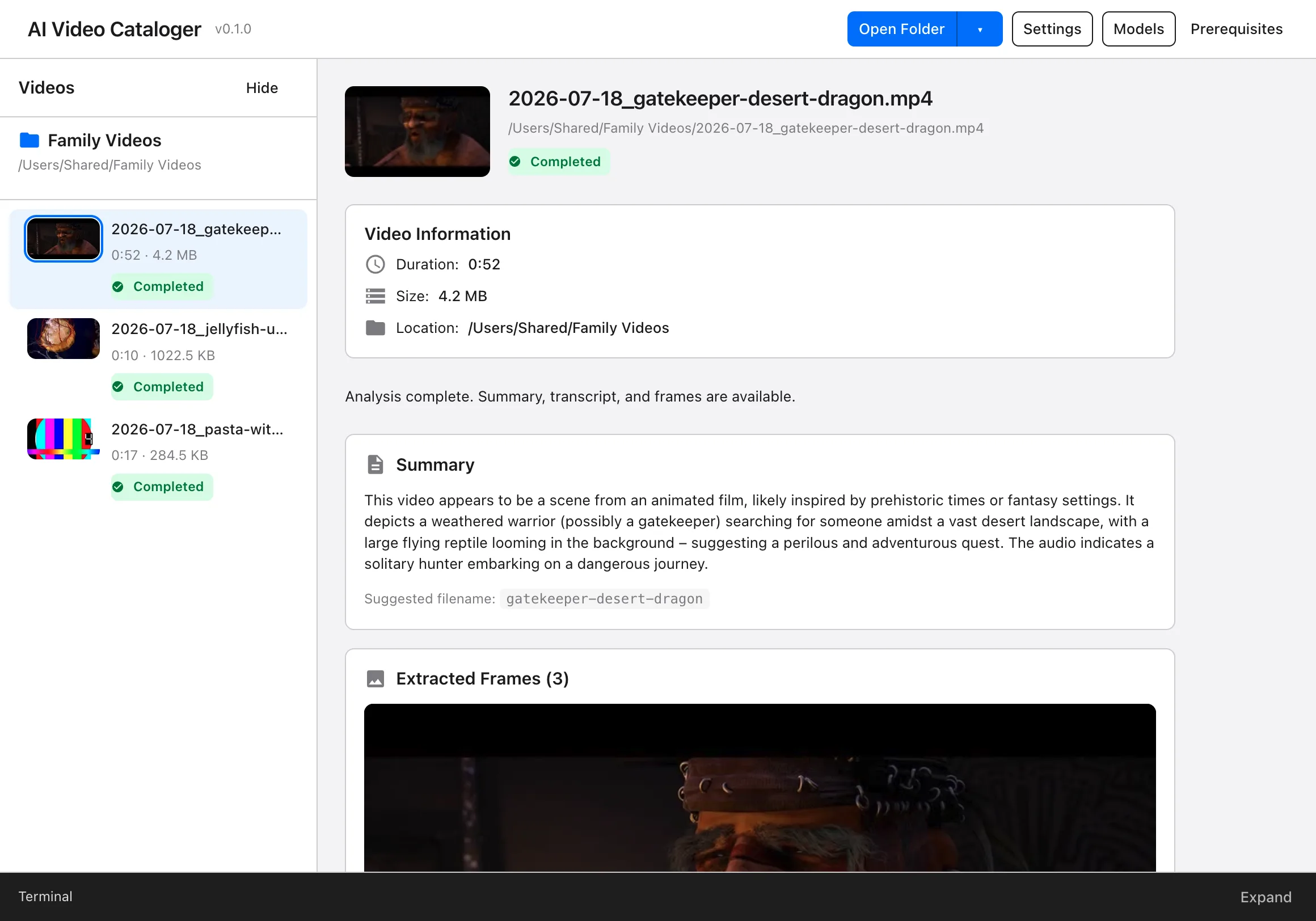
From camera noise to an organized library
Real output from the app - these are actual renames it produced:
How it works
Point it at a folder
Pick any folder of videos. Nothing is uploaded and nothing is moved.
AI watches and listens
Frames are sampled, speech is transcribed with Whisper, and your chosen AI writes a summary.
Named and organized
Every file gets a content-based name and lands in a catalog you can browse.
What it does
Six things you stop doing by hand.
Names with meaning
IMG_4021.mp4 becomes 2026-07-18_jellyfish-underwater-scene.mp4. Filenames are written from what the AI actually sees and hears.
Local-first privacy
Runs entirely on your Mac with local models via Ollama. Nothing leaves your machine unless you opt into an API.
Whisper transcription
Every spoken word is transcribed on-device into a transcript saved next to your video.
Bring your own AI
Local models, any OpenAI-compatible API with your key, or the agent CLIs you already use: Claude Code, Codex, Cursor Agent.
One-click batches
Point at a folder and press one button: frames, audio, transcript, summary and rename for every video in it.
GUI and CLI
A clean desktop app plus a first-class CLI with JSON output for scripts and automation.
Private by design
Your footage is personal. The app is built so it can stay that way.
Runs on your Mac
Frames, transcripts, summaries and the catalog live inside your folders. With local models, nothing ever leaves the machine.
Cloud only when you say so
An OpenAI-compatible API or an agent CLI handles only the steps you route to it - analysis, and transcription if you pick the Whisper API mode. Your key, your choice.
No telemetry
No analytics, no tracking, no phoning home. After the initial setup the app works fully offline with local models.
Scriptable to the bone
The same engine ships as a first-class CLI: NDJSON events, honest exit codes, perfect for cron jobs and automations. Install it from the app menu: AI Video Cataloger -> Install Command Line Tool.
$ ai-video-cataloger process ~/Movies/IMG_4021.mp4 --json{"type":"started","timestamp":"2026-07-18T10:15:00.000Z","command":"process_single","data":{"videoPath":"/Users/.../Movies/IMG_4021.mp4","options":{"frames":3,"skipRename":false,"timeout":120,"whisper":"local","whisperModel":"base"}}}{"type":"progress","timestamp":"2026-07-18T10:15:24.000Z","step":"transcribing_audio","percentage":60}{"type":"completed","timestamp":"2026-07-18T10:16:12.000Z","data":{"video":"IMG_4021.mp4","path":"/Users/.../Movies/2026-07-18_jellyfish-underwater-scene.mp4","status":"completed"}}
Will it run on your Mac?
With cloud models it always runs
Connect your own OpenAI-compatible API key or an agent CLI and any Apple Silicon Mac is enough - the heavy lifting happens elsewhere. Everything below applies to local models only. Transcription still runs locally by default with the small Whisper models, which any M-series Mac handles.
Apple Silicon Mac (M1 or newer) - macOS - the app itself is a ~153 MB download
8 GB RAM
Enough for the smallest local models - expect the Mac to be busy while it analyzes.
16 GB RAM
Runs the mid-size 12B models - the sweet spot of quality vs. resources.
32 GB+ RAM
Unlocks the largest local models - up to the 17 GB 27B tier.
A local model has to fit in memory next to macOS and your other apps - the system alone uses several GB of RAM.
On Apple Silicon there is no separate VRAM - the GPU shares unified memory with the system, so total RAM is the number that matters.
Disk space for models
You choose what to install in the setup wizard - nothing is downloaded without asking.
Which setup should you choose?
These recommendations assume short, social-media-style clips (tens of seconds up to ~2 minutes) - that is what we benchmarked internally (July 2026). The app works on longer videos too, but we have not benchmarked them.
A small batch - e.g. one day of footage (a few dozen clips)
Claude subscription
Best quality: the Claude Code harness with Fable - in our internal benchmark the only setup that beat a hand-curated reference. Cost-efficient: Opus 4.8. Around 40 s per clip, so a day of footage takes minutes.
ChatGPT subscription
The Codex harness with gpt-5.6-luna - the best Codex quality in our benchmark and the lightest on plan limits.
Fully local
Depends on your Mac. 16 GB+ - gemma3:12b gives a decent draft you will want to touch up; 8 GB - gemma3:4b works, but treat the names as placeholders.
A whole drive (1-2 TB)
Default route
Your own API key (gpt-5.5) + local Whisper - about 14 s per clip (~30-40 h per TB running in the background), pennies per clip, quality close to the harnesses.
Subscription harnesses
Not suited to bulk processing: ~40 s per clip plus plan limits. A sensible hybrid: run the whole drive through the API, then re-run your 50-100 most important clips through the harness.
Fully local
16 GB+ can run gemma3:12b overnight (~60-75 h per TB), free and offline, but expect draft-quality names.
Harness modes drive your subscription tool (Claude Code / Codex CLI) automatically. Occasional batches are normal plan usage; mass processing may conflict with your plan's terms and limits - check your provider's ToS. For large volumes, an API key is the honest route.
Independent of everything above: keep transcription local. Whisper large-v3-turbo runs on any Apple Silicon GPU at 2-4 s per clip, free and offline - there is no reason to pay for cloud transcription or upload your audio.
Questions, answered
Is my footage private?+
With local models - the setup the wizard recommends - everything runs on your Mac: frames, audio, transcripts and summaries never leave your machine. If you connect an OpenAI-compatible API or an agent CLI, only the steps you route there go through that provider. The app contains no telemetry at all.
What do I need to run it?+
An Apple Silicon Mac. On first launch the setup wizard installs whatever your choices need - for the fully local setup that means the local AI runtime (Ollama) and Whisper. ffmpeg is bundled with the app.
How much disk space do local models take?+
Whisper models range from about 75 MB to 3.1 GB; local vision models from about 3.3 GB to 17 GB. You choose what to install in the wizard.
Does it work offline?+
Yes - once the initial setup has downloaded your chosen models, the whole local pipeline runs offline. API and agent-CLI backends need network.
Does it change my files?+
It renames videos to the content-based name and keeps the original name in its catalog. Alongside your videos it creates frames/, transcripts/ and summaries/ folders with the extracted artifacts, plus a hidden .ai-video-cataloger folder with the catalog - all deletable at any time. It scans only the top level of the folder (mp4, mov, avi, mkv, webm). Nothing is uploaded and nothing is deleted.
Is it really free?+
The alpha is free. Local analysis costs nothing; if you bring an API key, your provider bills your usage.
Why does macOS warn me on first launch?+
The app is not yet notarized by Apple - that requires a paid developer account and is on our roadmap. macOS shows this warning for apps that are not notarized. Right-click the app and choose Open; if the option does not appear, go to System Settings -> Privacy & Security and click Open Anyway. You only need to do it once.
Ready to clean up your video folders?
Early alpha. macOS today - Windows and Linux in the future.
Download for macOS